Purchasing & Receiving
Produce OS Purchase Orders gives teams a simple way to manage inbound purchasing.
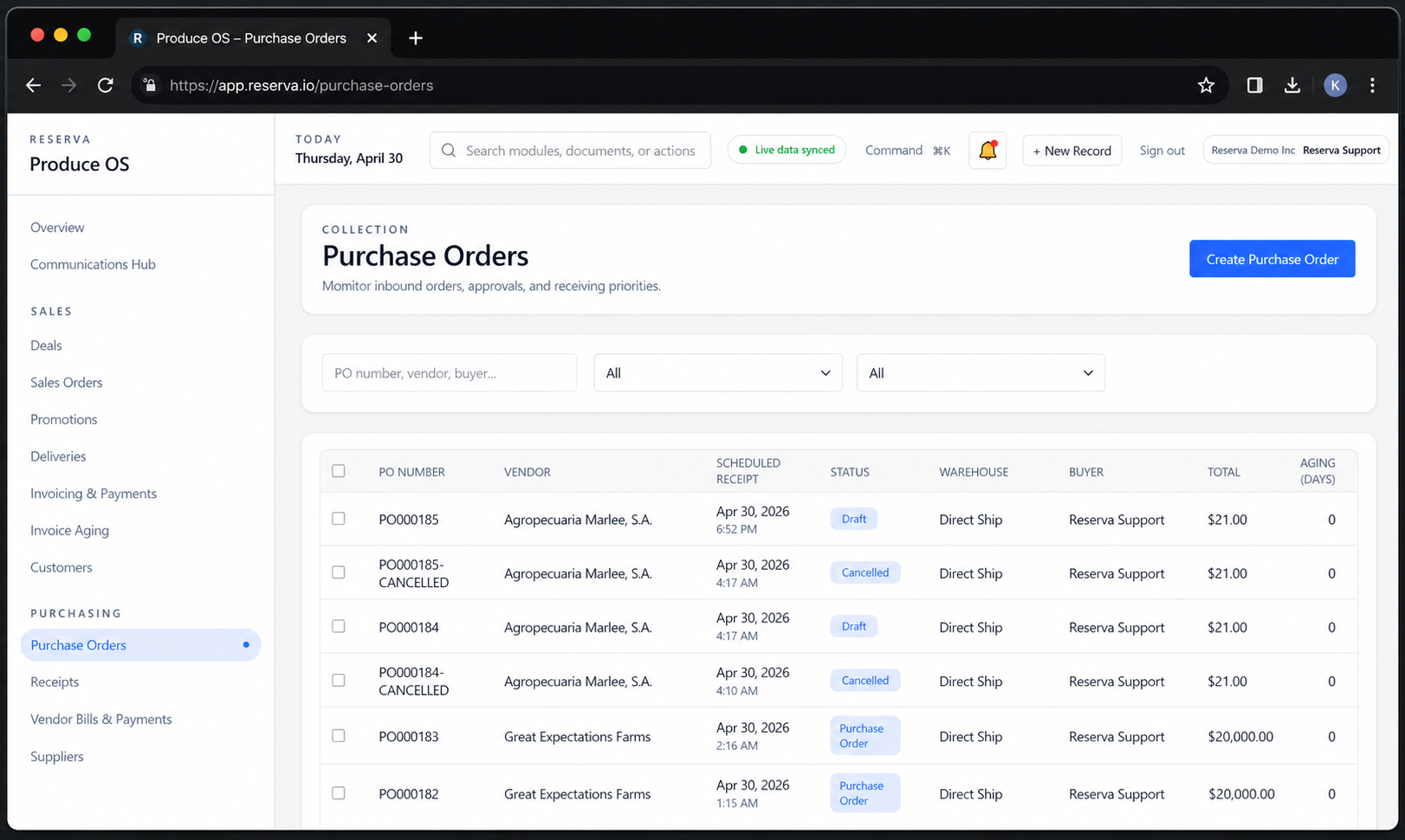
Instead of managing purchase orders through spreadsheets, emails and disconnected systems, Produce OS keeps purchasing activity organized in one place. Buyers can quickly search for a PO, filter by status, review totals, monitor aging and create new purchase orders when needed.
Because purchasing is connected to inventory, receiving, accounting and logistics, every order becomes part of the full operational flow. This gives teams better visibility into what is coming in, what still needs attention and how purchasing decisions affect the rest of the business.
Real-time Purchase Order Visibility
Live view of purchase orders across vendors, buyers, warehouses and receipt dates. Teams can quickly understand what has been created, what is still in draft, what has been confirmed and what has been cancelled without needing to open each order individually.
Simple Search and Filtering
Search by PO number, vendor, buyer or related information and narrow the list using simple filters. This makes it easier to find the right order quickly, especially when managing a large number of inbound purchases across multiple suppliers.
Scheduled Receipt Tracking
Each purchase order includes a scheduled receipt date, helping teams plan what product is expected and when. This gives buyers, warehouse teams and operations staff a shared view of incoming activity so they can prepare for receiving and avoid surprises.
Quick Actions for Creating Purchase Orders
Users can create a new purchase order directly from the dashboard. This keeps the workflow simple: review what is already open, identify what is needed, and create the next purchase order without leaving the workspace.
Warehouse and Direct Ship Management
The dashboard supports both warehouse receipts and direct ship workflows. Whether product is coming into a company location or moving directly from supplier to customer, teams can see the route clearly and keep purchasing aligned with fulfillment.
Buyer and Vendor Coordination
Every purchase order is tied to a vendor and buyer, making responsibility clear. This helps teams follow up faster, reduce confusion, and keep communication organized around the actual transaction.
Order Totals and Aging
Display order totals and aging information so teams can quickly identify older purchase orders, review financial exposure, and understand which orders may need follow-up. This helps purchasing stay organized while supporting better accounting and cash flow visibility.
Connected Produce Operations
Purchase orders are not isolated documents. In Produce OS, they connect to receiving, inventory, vendor bills, payments, direct shipments, and margin tracking. That means the purchasing dashboard is not just a list of orders: it is a control center for inbound product flow.
Ready to experience Produce OS?
Take your Produce Business to the NEXT LEVEL!